





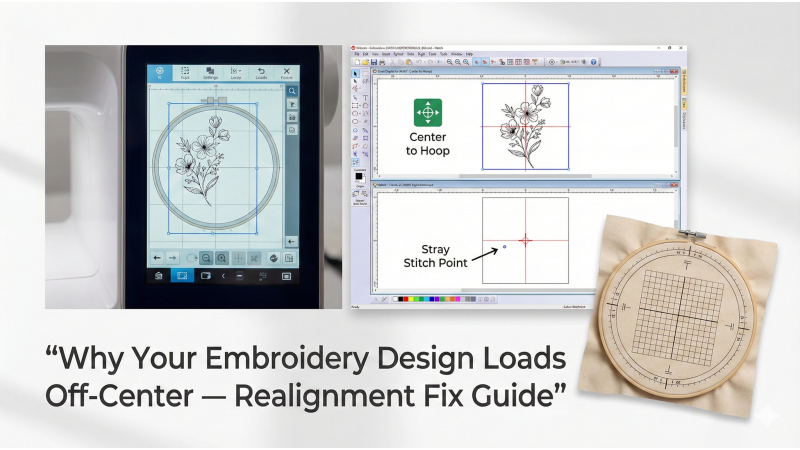
Why Your Embroidery Design Loads Off-Center — Realignment Fix Guide
One of the most confusing issues embroidery machine users face is when a design loads off-center, even though it looks correctly placed in the software. Misalignment can cause crooked stitching, wrong placement on garments, and wasted materials. Fortunately, off-center designs are usually easy to diagnose and fix once you understand how hoop positioning, machine settings, and design origins work together.
This guide explains the most common causes of off-center loading, how to correct them, and how to prevent alignment problems in future projects.
For professionally digitized, well-centered embroidery designs, visit EmbDesignTube.com.
1. Understanding How Machines Determine the “Center” of a Design
Every embroidery machine identifies the design center based on the stitching object's closest bounding box. If your embroidery design contains stray points, hidden stitches, or off-screen elements, the machine may misread the center and shift the entire design.
Software like mySewnet, Wilcom, or Hatch provides guidelines on how design centers are calculated. Useful references include:
2. The Most Common Causes of Off-Center Embroidery Designs
2.1 Hidden or Extra Points Outside the Design Area
Sometimes, a small hidden stitch, anchor point, or object sits far from the main artwork. The machine then redefines the center incorrectly.
2.2 Incorrect Hoop Selection
If the design was created using a different hoop than the one selected on the machine, the machine may shift the design to match its expected center point.
2.3 Hooping Errors
Fabric tension issues, hoop slippage, or misaligned hoop placement marks can make the machine appear to stitch off-center even when the design is correct.
Practical hooping alignment guides can be found at:
- Create Whimsy – Centering With Hoop Templates
- GPI Supplies – Centering a Hoop for Tubular Embroidery
- EmbroideryHooping – Centering on Bags
2.4 Machine-Specific Centering Settings
Many machines automatically adjust design position based on presets, offsets, or alignment memory. If an offset exists from a previous project, it may shift a new design unintentionally.
Hatch explains why designs sometimes shift after offsetting: Hatch Embroidery Support – Position Changes After Offset
2.5 Improper Use of Snap-Hoops or Magnetic Frames
These hoops require precise placement to ensure that the design center aligns with the frame center. Any tilt or shift can produce off-center stitching.
Learn more about proper centering with snap hoops here: Snap Hoop Centering Guide
3. How to Fix Off-Center Design Issues
3.1 Reset the Machine’s Center and Default Position
- Turn off design memory settings.
- Clear offsets or alignment adjustments.
- Reboot the machine for a fresh centerpoint calibration.
3.2 Re-Center the Design in Software Before Exporting
- Use the “Center Design” or “Center to Hoop” tool.
- Remove stray points or hidden stitches outside the design boundaries.
- Ensure the design origin is set to the true center, not the corner.
Hoop alignment instructions and centering tools for Hatch can be found here: Hatch – Centering Hoops
3.3 Rehoop the Fabric Using Accurate Templates
- Use printed templates to align the embroidery’s exact center.
- Use vertical and horizontal grid lines to ensure straight placement.
- Check fabric tension to avoid shifting during stitching.
3.4 Verify Hooping Tools and Placement Guides
MaggieFrames provides detailed placement and centering instructions: Ultimate Embroidery Placement Guidelines
4. Preventing Off-Center Designs in Future Projects
- Always choose the correct hoop size in both machine and software.
- Center the design before exporting any file format.
- Avoid resizing directly on the machine, as it can shift the design origin.
- Use hoop templates or grid sheets for consistent placement.
- Periodically recalibrate your machine’s hoop sensors.
Conclusion
Most off-center loading issues are caused by simple software or hooping errors. Once you understand how your machine determines the design’s center, fixing and preventing misalignment becomes straightforward. By using accurate templates, checking offsets, and correctly centering your design in embroidery software, you can ensure perfect placement every time.
For downloadable designs that are correctly centered and ready to stitch, visit: EmbDesignTube.com
Leave a comment