





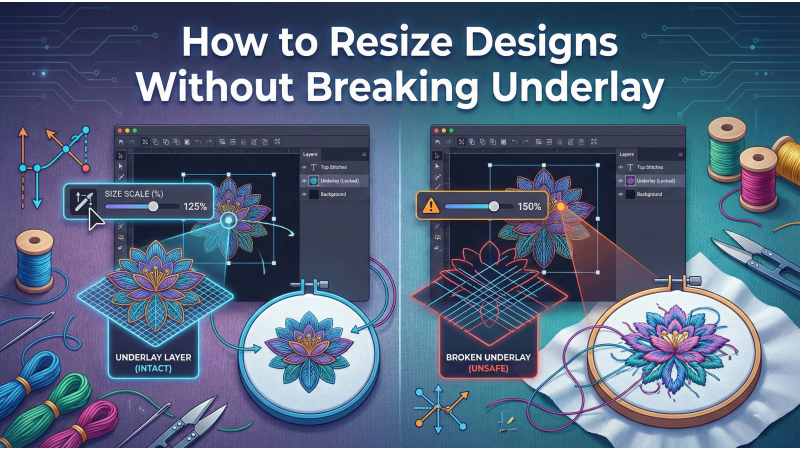
How to Resize Designs Without Breaking Underlay
Resizing embroidery designs looks easy, but beneath every stitch lies a complex structure of underlay, density, pull compensation, and travel paths that must work together in harmony. When you enlarge or reduce a design without recalculating these elements, the entire embroidery can collapse — causing gaps, distortion, thread breaks, or poorly supported satin columns.
Whether you are resizing designs for kidswear, hoodies, caps, tote bags, uniforms, or boutique garments, understanding how resizing affects stitch logic is essential. This guide breaks down the professional approach to resizing and naturally includes helpful tutorials like this detailed video on resizing basics, insights from Wilcom’s push & pull compensation guide, and structural references from the Underlay 101 PDF that explain how underlay behaves during scaling.
Why Resizing Affects Stitch Logic
Many beginners assume resizing is simply dragging a corner or entering a percentage value. But embroidery designs are engineered using precise stitch densities, minimum stitch lengths, underlay layers, and tie-in/tie-off points. Stretching or shrinking a design without recalculation breaks this delicate framework.
When resizing:
- Stitch count must change
- Density must adjust based on new scale
- Underlay paths must be recalculated
- Pull compensation must be modified
- Satin widths may need filling conversion
For an excellent visual explanation, this video on how stitch structures react during resizing shows how underlay collapses when a design is scaled incorrectly.
1. Never Resize a Design Inside the Machine
Resizing directly on the embroidery machine is one of the most damaging habits. Machines often “stretch” stitches instead of recalculating them. This leads to:
- Too-wide satin columns when enlarging
- Overly dense stitching when shrinking
- Underlay no longer matching the top stitches
- Thread breaks and puckering
For example, if you enlarge a satin-text logo by 150% inside the machine, the underlay will not expand properly, leaving the top stitches unsupported. On the other hand, shrinking a design compresses stitches too tightly, causing breakage.
Professional embroiderers always resize using digitizing software — never on the machine — because machines cannot recalculate stitch logic properly.

2. Use Digitizing Software That Recalculates Stitches
High-quality software intelligently recalculates stitch count, density, and underlay. Programs like Hatch offer advanced resizing functions designed for production-level accuracy. A great guide to study is this complete Hatch resizing tutorial, which explains how auto-recalculation preserves stitch quality.
Enabling features such as:
- Automatic density adjustment
- Underlay recalculation
- Preserve minimum stitch length
- Adaptive stitch angles
- Pull compensation balancing
ensures the resized design behaves like a properly digitized file rather than a distorted version. Another helpful resource is this professional resizing workflow guide, which breaks down how stitch types should change with scale.
3. Check Underlay Type When Scaling
Underlay is the foundation of embroidery. It stabilizes fabric, supports top stitches, reduces distortion, and maintains design structure. Resizing changes how each type of underlay responds:
- Edge-walk underlay: Must expand proportionally under satin
- Zig-zag underlay: Strengthens larger areas but must scale correctly
- Double zig-zag: Required for wide satin columns
- Center-walk: Must be repositioned properly when reducing size
- Fill underlay: Needs uniform expansion under large fills
If underlay does NOT scale correctly, the top stitches lose support and the embroidery fails. The Underlay 101 reference provides an excellent breakdown of how underlay works structurally.
Similarly, understanding push-pull compensation is crucial, because resizing alters tension forces that shift stitches during embroidery.
4. Watch High-Value Tutorials to Understand Structure
Resizing involves more than changing sizes — it requires understanding stitch physics. These highly searched resources provide visual clarity:
- A practical overview of resizing mistakes: Video tutorial on scaling designs safely
- Underlay foundations and scaling behaviors (Underlay 101 PDF)
- Push & pull compensation concepts (Wilcom)
- Hatch resizing workflow (Magnetic Hoop)
- Resizing logic explained step-by-step (Embroidery Legacy)
Learning from multiple sources helps beginners and professionals understand how embroidery behaves mechanically during resizing.
5. Adjust Density After Resizing
Density controls coverage, texture, and stitch balance. When scaling:
- Increasing size requires decreasing density
- Reducing size requires increasing density
If density is not corrected, you’ll face:
- Puckering
- Fabric distortion
- Thread breaks
- Gaps in stitching
Fabrics behave differently — hoodies need looser density, caps need tighter density, and kidswear often requires soft, flexible stitching. These adjustments ensure the resized design maintains smooth, clean coverage.
6. Verify Underlay Coverage in Preview Mode
Preview simulations are essential. They help detect:
- Incorrect underlay alignment
- Overlaps or gaps
- Broken travel paths
- Unbalanced stitch layers
Zoom into the design to confirm that each underlay layer supports the top stitching evenly.
7. Test on Proper Fabric Before Production
No matter how perfect a resized design looks on screen, testing on real fabric is the only way to validate:
- Stretch behavior
- Underlay strength
- Density balance
- Thread break points
- Push-pull distortion
Always sample test on the fabric and stabilizer combination intended for production.
Conclusion
Resizing embroidery designs without breaking the underlay requires precision, software knowledge, and understanding of stitch behavior. By using proper digitizing tools, recalculating density, analyzing underlay layers, previewing in simulation mode, and testing on real fabric, you can resize any design — large or small — while preserving professional stitch quality.
Leave a comment